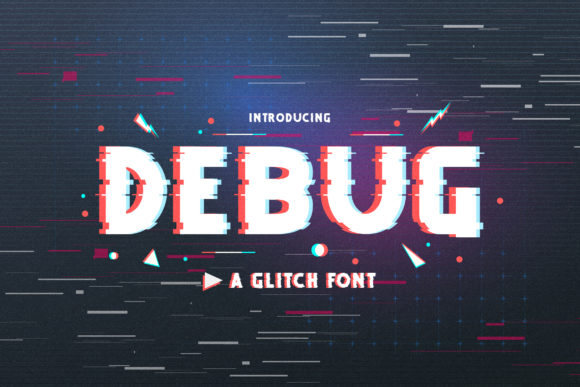
Debug: A Bold Font for Business
As a small business owner, choosing the right font can make a big difference in how your brand is perceived. Debug is a display font that brings energy and clarity to your design work, making it ideal for headlines, logos, and other eye-catching elements. Its all-caps style and multilingual support give it a modern, versatile feel that works well across many industries.
Debug has a clean, geometric look that feels both contemporary and professional. It’s not too flashy, but it has enough character to stand out without overwhelming your message. This makes it perfect for businesses looking to create a strong visual identity while keeping things simple and easy to read.
Using Debug in Real Business Materials
Whether you're designing a logo, creating social media graphics, or working on packaging, Debug can help you maintain a consistent look across all your materials. For example, a bakery might use Debug for its logo and menu headings, giving it a fresh, modern feel that appeals to customers looking for quality and style.
Handmade candle brands often rely on fonts that reflect their artisanal nature. Debug offers a clean, confident appearance that pairs well with natural imagery and soft colors, helping to reinforce a sense of authenticity and care.
For beauty product packaging, Debug can be used for product names and taglines. Its bold style draws attention while still maintaining a level of sophistication that matches high-end branding. It also works well for coaching businesses, where clear, impactful messaging is key to building trust with clients.
When to Use Debug
Debug is best suited as a headline or display font. It shines when used for logos, banners, and other prominent text elements. However, it's not ideal for long blocks of body text due to its all-caps style, which can be harder to read in extended formats.
That said, Debug can still serve as an accent font in certain contexts. Pairing it with a more readable typeface like a sans serif or serif font can create a balanced design that looks professional and cohesive. For instance, using Debug for a headline and a clean sans serif for the body text can add visual interest without sacrificing readability.
When designing for digital platforms, such as Instagram posts or website banners, Debug can help your content stand out in a crowded space. Its bold appearance makes it ideal for thumbnails, call-to-action buttons, and other interactive elements that need to grab attention quickly.
Readability and Practical Considerations
While Debug is visually striking, it's important to consider how it will appear in real-world settings. On small labels, mobile screens, or printed packaging, the font should remain legible at different sizes. Testing it on various materials before finalizing your design is a smart move.
For example, if you're designing a product label for a café, you’ll want to ensure that Debug looks good at both large and small sizes. If it becomes too tiny, the letters may lose their clarity, making it hard for customers to read from a distance.
Testing Debug on mockups or samples can help you see how it performs in different scenarios. This step can save time and prevent costly mistakes down the line.
Font Pairing Tips
Pairing Debug with other fonts can enhance your overall design while keeping things balanced. A common approach is to pair it with a clean, neutral typeface like Arial or Helvetica. This creates a contrast that highlights the unique qualities of Debug without clashing.
If you're going for a more traditional look, pairing Debug with a serif font like Georgia or Times New Roman can add a touch of elegance. This combination works well for businesses that want to blend modern and classic elements in their branding.
For a more creative or artistic feel, consider pairing Debug with a script or handwritten font. This can add personality to your designs while still maintaining a level of professionalism.
Commercial Licensing and Branding
Before using Debug in any commercial project, it's essential to check the font's licensing terms. Some fonts are free for personal use only, while others require a license for business or resale purposes. Make sure you understand what you're allowed to do with the font, especially if you're using it on products, packaging, or digital downloads.
Proper licensing ensures that you're using the font legally and avoids potential issues down the road. It also shows respect for the designer's work and helps maintain the integrity of your brand.
Debug is more than just a font—it's a tool that can help you build a stronger, more recognizable brand. Whether you're launching a new business or updating your existing materials, choosing the right typeface can have a lasting impact on how your audience perceives your company.