Glossy Sticker: A Font for Creative Web Design
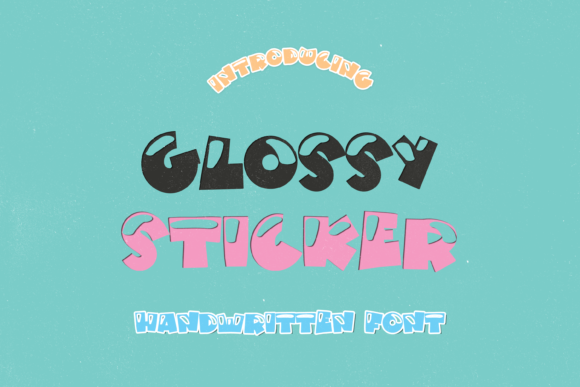
While working on a boutique online store’s homepage, I came across a font that immediately caught my eye—Glossy Sticker. It’s a display font with a playful, bubble-like aesthetic that adds a 3D effect through subtle shadows. As someone who regularly tests fonts for web projects, I wanted to see how it would perform in real layouts and what kind of visual impact it could bring to a digital brand.
Visual Characteristics and Personality
Glossy Sticker has a distinct personality. Its rounded edges and glossy finish give it a fun, approachable feel that works well for children’s designs, retro graphics, and creative posters. The font feels like it’s been lifted from a vintage toy or a colorful comic book. The shadows add depth, making it stand out without being overwhelming.
When used in a hero section, it can draw attention and set the tone for a website. I tested it over a soft gradient background and found that it retained its clarity even when placed against light or dark colors. The contrast was just right, and the overall look felt modern yet nostalgic.
Real-World Applications
I considered using Glossy Sticker for a coaching website’s headline. The font’s playful nature matched the brand’s energetic vibe, but I quickly realized it might not be the best choice for body text. Instead, I paired it with a clean sans serif font for the main content, which created a balanced hierarchy.
For a product landing page, I experimented with the font as a call-to-action button label. The glossy effect made the button feel more tactile, almost like a sticker you’d stick on a notebook. It worked well in smaller sizes, though I had to adjust the spacing to ensure readability on mobile screens.
In a blog header, Glossy Sticker added a sense of whimsy without distracting from the content. It was perfect for a section title that needed a bit of flair but still had to remain legible.
Readability and User Experience
One of the first things I checked was how Glossy Sticker performed on different screen sizes. On desktop, it looked great, but on mobile devices, I noticed some characters were slightly harder to distinguish, especially at smaller sizes. I adjusted the font size and added a bit more line height to improve scanning behavior and reduce eye strain.
When placing the font over an image banner, I made sure there was enough contrast between the text and the background. A dark overlay helped the text pop, and the shadows in the font didn’t interfere with the underlying image. This made it ideal for promotional banners or campaign landing pages.
For a small business website, I used Glossy Sticker as a decorative accent in the footer. It wasn’t the main text, but it added a touch of personality that aligned with the brand’s identity. I made sure it wasn’t overused, as too much of a good thing can dilute the design.
Font Pairing and Design Considerations
Pairing Glossy Sticker with a simple, readable font is key. I often go for a sans serif for body copy because it complements the font’s playful style without competing with it. For a more editorial feel, a serif font could work well in headings or subheadings, adding a layer of sophistication.
When considering commercial use, I always check the licensing terms. Glossy Sticker should come with clear guidelines for web use, including webfont formats like WOFF and WOFF2. It’s also important to verify if the font supports multiple languages, especially if the website targets international audiences.
Another consideration is the availability of different weights. If the font only comes in a single weight, it might limit design flexibility. But if it includes variations like bold or light, it opens up more options for visual hierarchy and layout performance.
Branding and Digital Identity
Glossy Sticker can be a strong asset in a digital brand kit. Its unique style makes it ideal for logo design, social media graphics, and packaging design. When used consistently across platforms, it helps reinforce brand recognition and creates a cohesive visual language.
For a creative portfolio, I used the font in the project titles to give each section a distinct personality. It worked well alongside minimalistic backgrounds, allowing the content to shine while still maintaining a fun, engaging feel.
Overall, Glossy Sticker is a versatile display font that can elevate a website’s aesthetic when used thoughtfully. It’s not a one-size-fits-all solution, but when paired correctly, it adds a level of creativity and polish that can make a digital experience more memorable.
Final Thoughts
As I wrapped up the project, I felt confident that Glossy Sticker had contributed to a more dynamic and visually appealing website. It wasn’t just about the font itself—it was about how it fit into the broader design system and supported the brand’s voice. For web designers looking to add a touch of personality to their layouts, this font is definitely worth testing.